Demonstration. Everything here is invented. Do not enter real people or real rotas.← Find Care Scotland

Rota Core

Fill the week. See the gaps. Check as you go.

Weekly rotas for care teams, with open shifts, swaps between colleagues and the days people cannot work. Each person is checked as they are put on a shift: clashes, booked leave from Care Core, and the rest and hours limits you set yourselves.

  • No one in two placesA person cannot be put on two shifts that overlap, and nothing overrides that. Leave and "cannot work" days are warnings that need a written reason.
  • Your limits, not oursRest between shifts and weekly hours are checked only if you type a number. Rota Core never says what a contract or the law allows.
  • Staff see what movedStaff see only published weeks, and anything added after publishing is marked, so changes are never silent.

What it does

Make it, publish it, change it, and keep the record.

01

A week at a glance

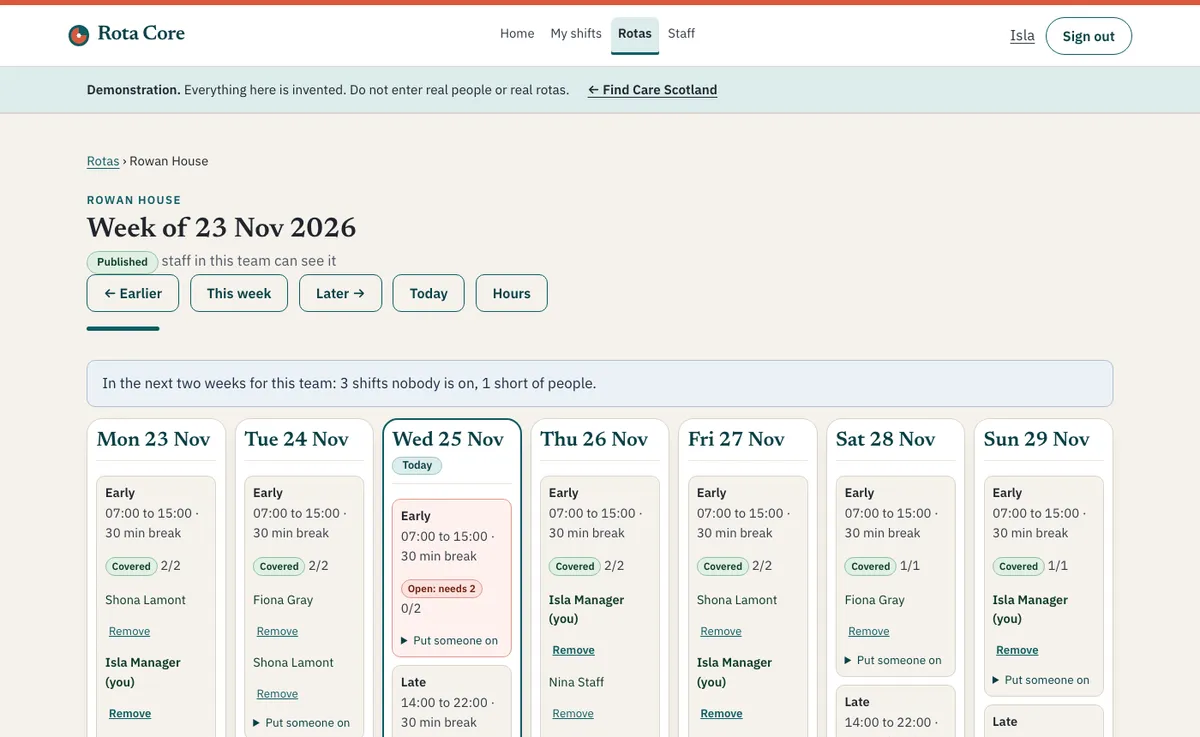
Each team's rota is one week at a time. Usual shifts (Early, Late, Night) go on in a click, with the unpaid break taken off the hours. A shift says how many people it needs and shows, in words, whether it is covered, short or open.

  • Copy a week into the next, with the same people where they fit
  • Nights that finish the next morning are handled
  • Print the week for the office wall
A team's rota for one week: each day with its early, late and night shifts, who is on them and whether each is covered or needs more people.

02

Checked as people go on

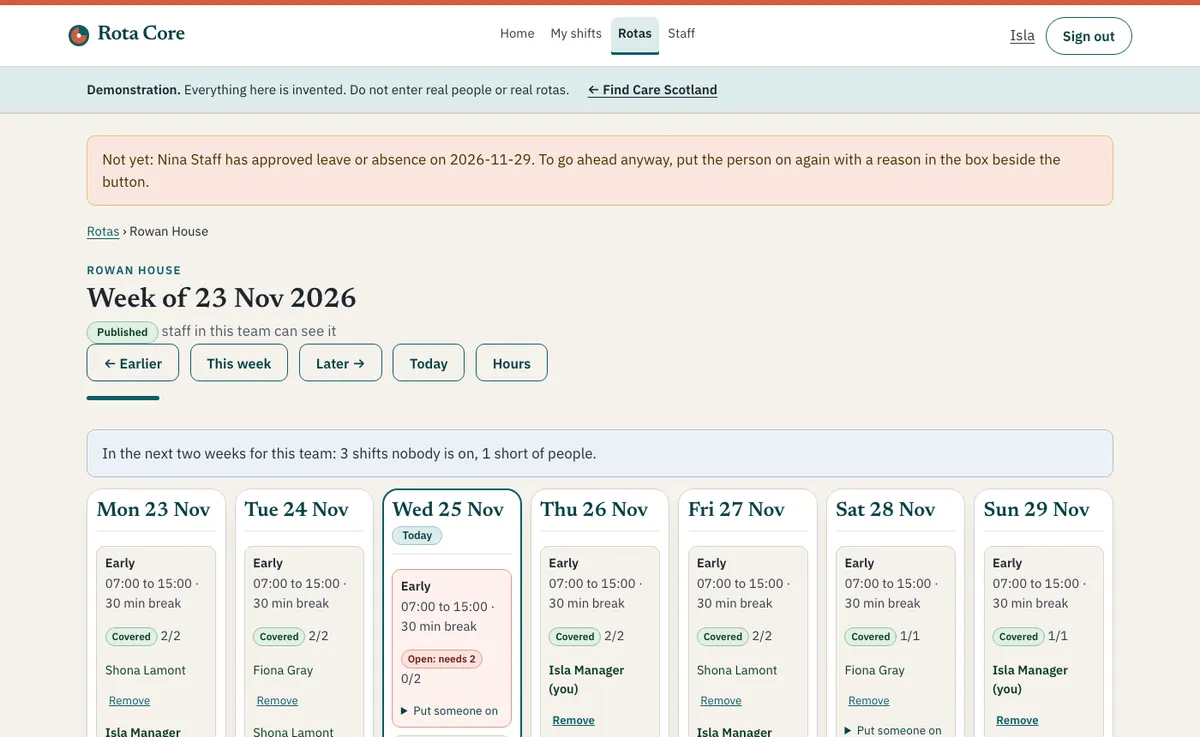
Putting someone on a shift runs the checks at once. A clash is refused. Approved leave, a day they said they cannot work, too little rest or too many hours are warnings: go ahead only with a written reason, kept on the shift and in the audit trail.

  • Leave is read from Care Core: it says someone is away, never why
  • Rest and weekly hours exist only if you set them
  • Nothing is silently overridden
A warning at the top of a rota: a member of staff has approved leave on that day, and the manager is asked for a reason to go ahead.

03

Staff see their shifts, and say what they cannot do

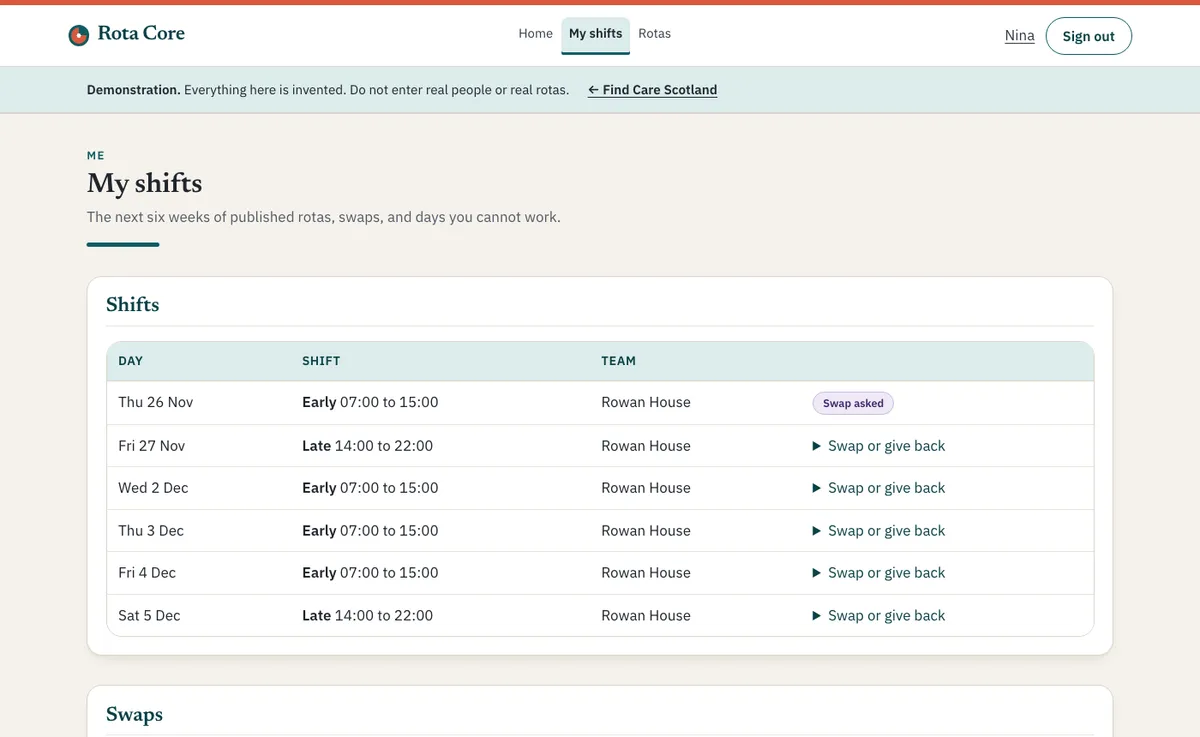
Once a week is published, each person sees their own shifts and can ask a named colleague to swap, or give a shift back. They also say which days they cannot work, so the manager knows before the rota is made.

  • The colleague says yes or no first
  • Nothing changes until a manager approves
  • Large type, readable on a phone
A member of staff's own shifts for the coming weeks, with a swap already asked for one and an option to swap or give back the others.

04

You decide the swaps

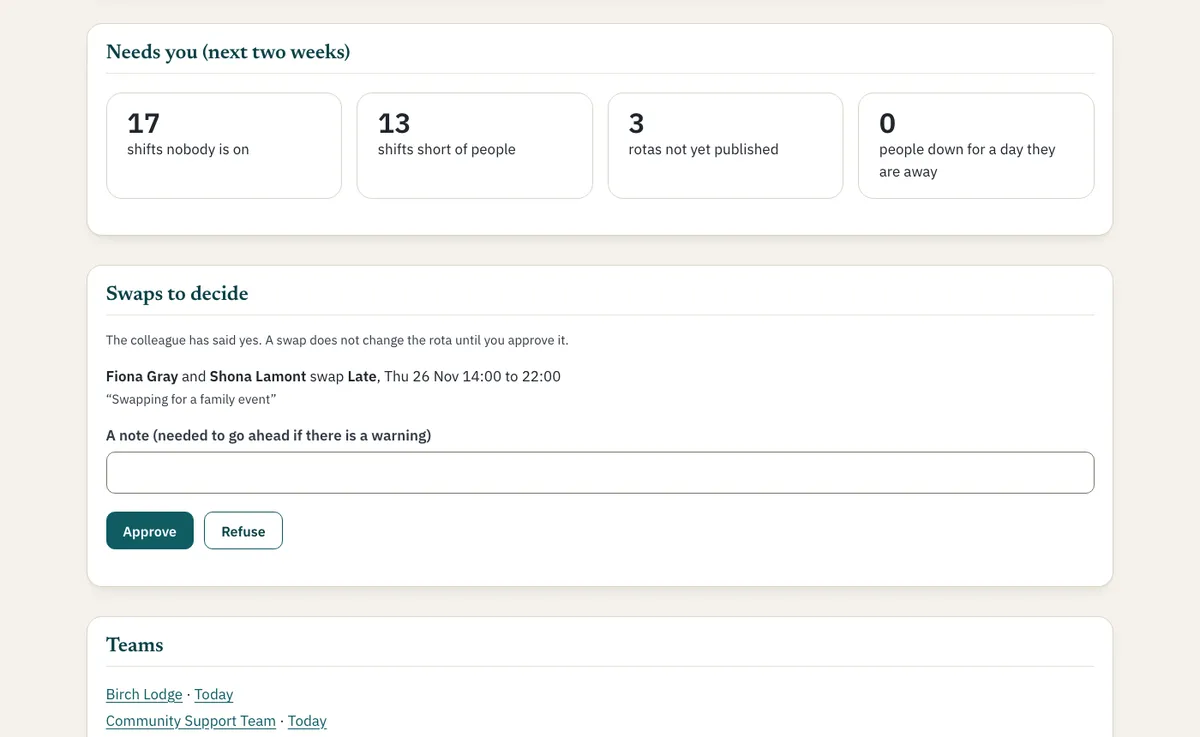
A swap that a colleague has agreed waits for a manager, with the reason the person gave. Approving it moves the shift and re-checks the new person, so a swap cannot sneak past a clash or leave.

  • Managers decide only their own teams' swaps
  • The old assignment is marked swapped, never deleted
  • The front page counts open and short shifts and rotas not yet published
The manager's front page: counts of shifts nobody is on and shifts short of people, and a swap waiting to be approved or refused.

05

Hours against contract

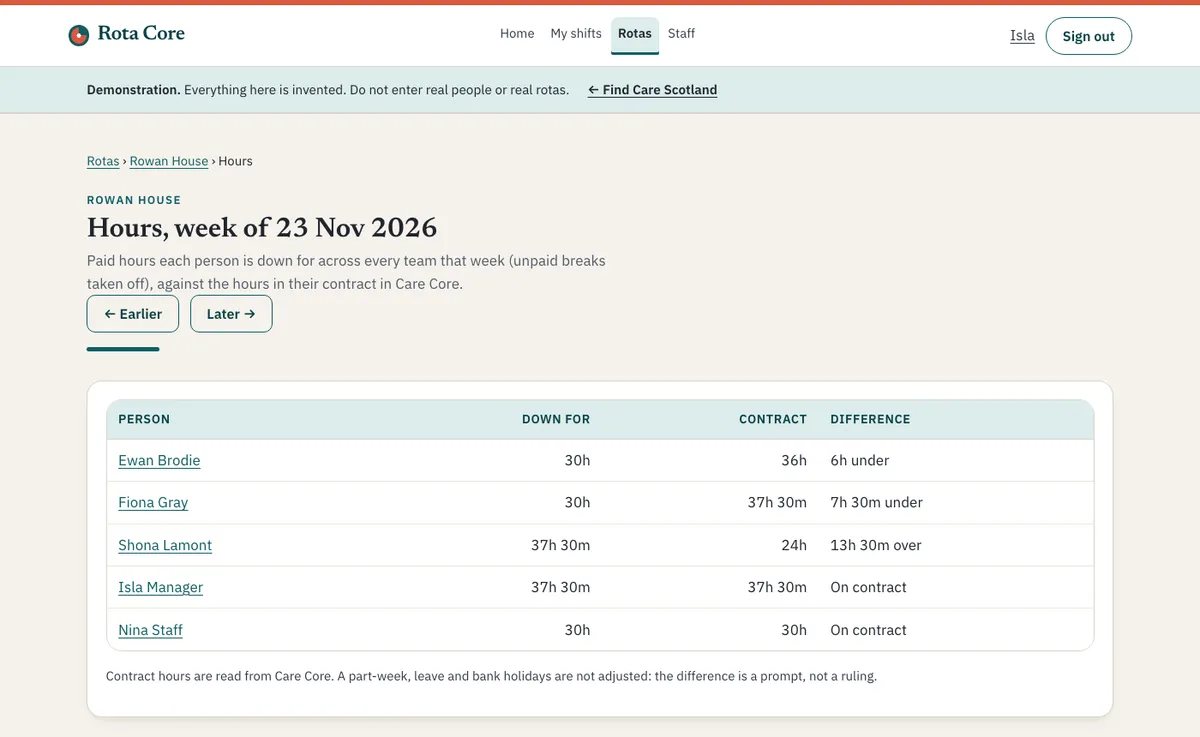
For any week, each person's paid hours across every team against the hours in their contract in Care Core, and a flag if they pass your own weekly limit. Unpaid breaks are taken off.

  • A prompt for a conversation, not a ruling
  • Part-weeks, leave and bank holidays are not adjusted
  • Contract hours are read from Care Core
The hours report for a team's week: each person with the hours they are down for, their contract hours and the difference.

06

Who is working today

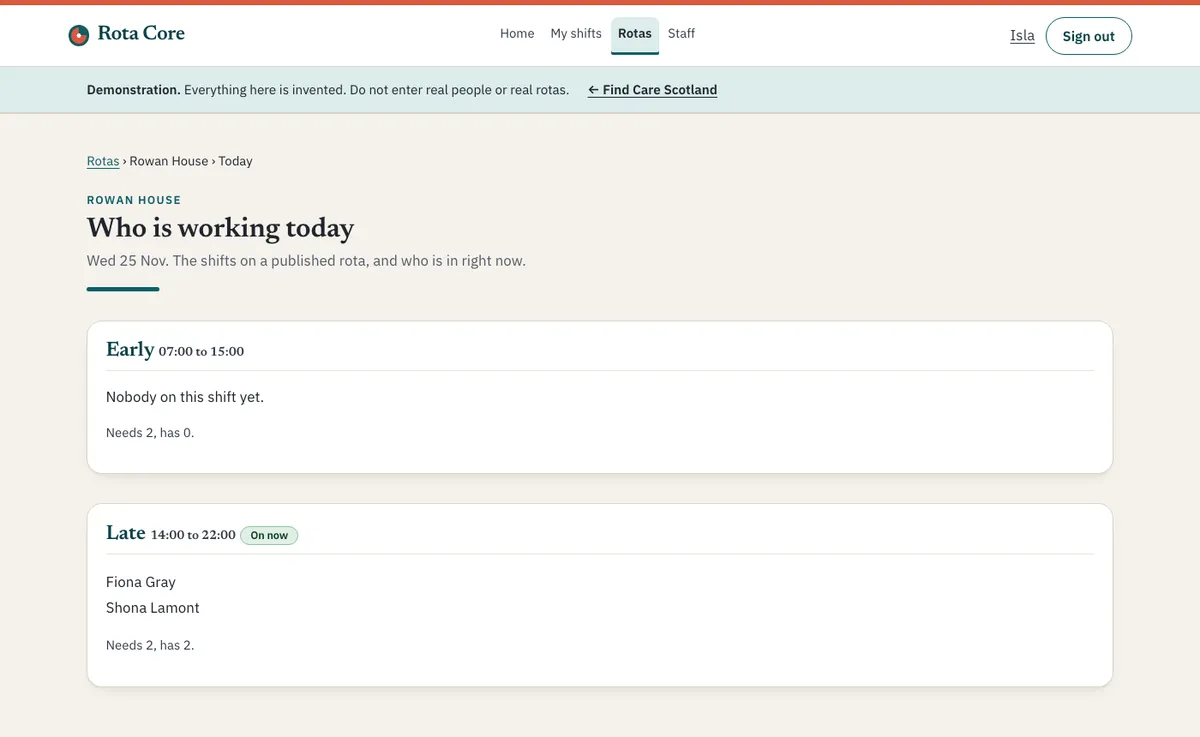
Every shift today with who is on it and who is in right now. Staff see published weeks for their own team, and managers see drafts as well.

  • Needs and who is actually on, shift by shift
  • A shift no one is on is plain to see
  • Open from the front page
Today's shifts for a team with who is on each and a mark for the shift that is on now.

The life of a week

From an empty grid to a published rota.

  1. DraftedAdd the shifts, or copy last week. Only managers see a draft.
  2. Filled and checkedPut people on. Clashes are refused; leave, days off, rest and hours warn.
  3. PublishedThe team sees it. Anything added later is marked as added since published.
  4. KeptSwaps and removals change the rota, never erase it. The audit trail shows who did what.

Seeing the gaps

Where do we need someone?

The front page counts, for your teams, the shifts nobody is on and the shifts short of people over the next two weeks, how many rotas are still drafts, and anyone down for a day Care Core says they are away.

A manager makes the rota only for the teams they are given. Senior managers and administrators see every team. Auditors can read everything and change nothing.

  • Open and short shifts in the next two weeks
  • Rotas not yet published
  • People down for a day they are away
  • Swaps waiting for a decision
  • An audit trail where a removed or changed row shows

One suite, joining up

A rota that knows who is away.

Rota Core reads your staff, teams, contract hours and booked leave from Care Core, so nobody is typed in twice and leave shows on the rota by itself. Care Core's My work lists each person's next shifts, and its search finds the team's rota.

How the suite joins up around Care CoreCare Core sits in the centre. Care Plans, Digital ID, Policy Core, Referrals, Contracts, Strategic Plans, Incident Core, EngageTrack, Improvement Core, Learning Core and Rota Core are each connected to it today. Rota Core is the product you are looking at.Care Corethe recordCare Planscare recordsDigital IDstaff cards and trainingPolicy Corepolicies and readingReferralsheld in Care CoreContractsreads the peopleStrategic Plansteams own projectsIncident Coreincidents and restraintEngageTrackbehaviour supportImprovement Corecomplaints and improvementLearning Coretraining and certificatesRota Corerotas and shifts
Every line is connected today. Click any product to visit it. See the whole suite, from referral to care delivered.

Connected today

  • Care Core keeps one record of each member of staff, their teams and contract hours. Rota Core reads them.
  • Leave: approved leave and recorded absence are read from Care Core as "away". Never why.
  • My work and Search in Care Core show each person's next shifts and swaps, and managers what to decide.
  • Sign in with Care Core, and a leaver stops being able to sign in on their last day. Their past shifts stay.

Coming next

  • Who is trained for a shift, from Learning Core, so a rota shows who holds the training a shift needs.
  • Reminders by email when a shift changes after publishing.
  • Calendar feeds for each person's own shifts.

Questions people ask

Does it work out how many staff a service needs?

No. You say how many people each shift needs. Rota Core shows whether you have that many.

Does it enforce working time rules?

No. It does not know what your contracts, policies or the law allow. If you type a least-rest and a most-hours number, it warns when a person would go past them, and a manager can override with a written reason. If you type nothing, nothing is checked.

Does it tell us why someone is away?

No. Care Core tells Rota Core that a person is away on certain dates, and nothing else. Sickness and leave look the same here.

Can staff change the rota themselves?

They can ask: for a swap with a named colleague, to give a shift back, or to say which days they cannot work. Nothing changes until a manager approves.

Can we use it without Care Core?

Yes. Add staff in Rota Core and connect Care Core when you are ready. Leave then shows on the rota too. The key needs read permission on people, staff and teams.

Try it now

The demonstration holds invented staff and invented rotas, and is rebuilt every night. Sign in as a different role to see what each can do.

  • morag.admin@demo.example Administrator
  • callum.senior@demo.example Senior manager
  • isla.manager@demo.example Service manager
  • nina.staff@demo.example Staff
  • alasdair.auditor@demo.example Auditor (read only)

Password for every account: DemoPass2026!

Sign in to the demonstration